
 Free
Free
v1.0
KUBORR16_Free
Free
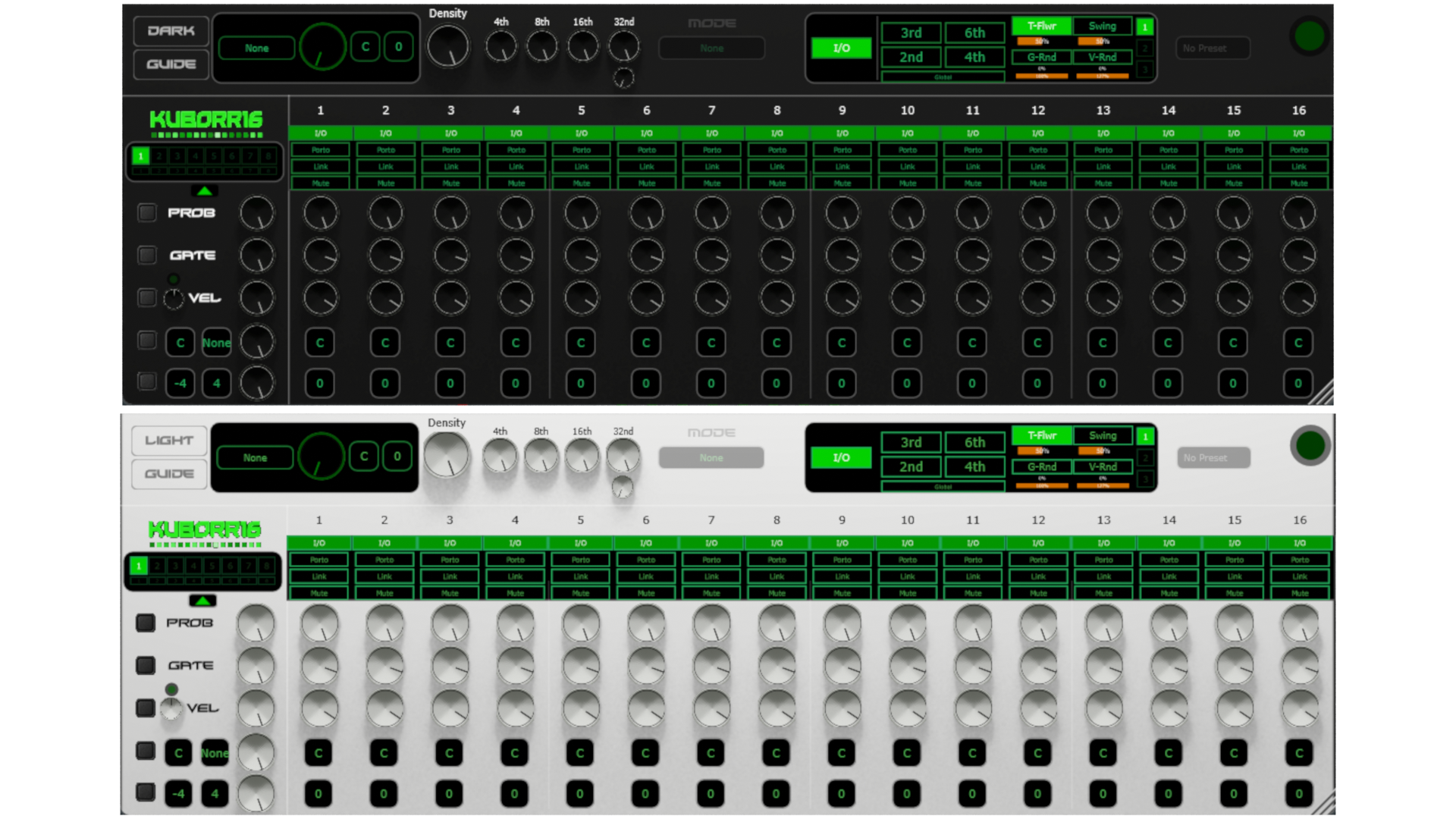
SEQUENCER CONTROLS:
- Prob: Probability slider (0-100%) controls note trigger chance
- Gate: Note duration (0-100%) controls how long note plays
- Vel: Velocity intensity (0-100%) controls note loudness
- Note: Pitch selection (C-B) chromatic note choice
- Oct: Octave range (-4 to +4) octave transposition
STEP BUTTONS:
- I/O: Enable/disable step (when OFF, step is skipped)
- Porto: Enable portamento/glide between notes
- Mute: Mute step (step processes but NO sound output)
Right-click Mute to toggle Randomise mode - when active the LED turns
orange and the mute state re-rolls randomly at the start of every
16-step cycle (right-click again to turn it off)
- Link: Note Tie - hold note across steps. Right-click to set tie length (Tie 1-15 steps)
- Difference: I/O skips step entirely, Mute processes it silently
STEP COPY/PASTE:
- Right-click step label to copy/paste step data
- Copies all controls: prob, gate, vel, note, octave, buttons
RANDOMIZATION:
- Click R buttons to randomize rows (Prob/Gate/Vel/Note/Oct)
- Depth knob (0-100%) controls randomization strength
- Right-click R button to undo last randomization
VELOCITY CONTROLS:
- Vel Curve: -1 (log boost quiet), 0 (linear), +1 (compress quiet)
- Floor button: Raises minimum velocity so no note disappears
DOUBLE 32ND KNOB:
- Probability of playing a second 32nd note on same step
- Creates rapid note doublings for rhythmic texture
PATTERN BANKS:
- Disabled in free version
BANK COPY/PASTE:
- Disabled in free version
PRESETS:
- Disabled in free version
TOGGLE CLUSTER TABS (1 / 2 / 3 LEDs in top-right holder):
- Select tab 1, 2 or 3 to switch between control groups in the holder
- Tab 1: Accents and modulation controls
- Tab 2: Disabled in free version
- Tab 3: Disabled in free version
TAB 1 - ACCENTS AND MODULATION:
ACCENT BUTTONS (2nd / 3rd / 4th / 6th):
- 2nd: Accent every 2nd step (+35% velocity boost)
- 3rd: Accent every 3rd step (+35% velocity boost)
- 4th: Accent every 4th step (+35% velocity boost)
- 6th: Accent every 6th step (+35% velocity boost)
- Multiple accent buttons can be active simultaneously
T-FLWR (TEMPO FOLLOWER):
- T-Flwr toggle: Enable BPM-driven randomization ON/OFF
- Intensity bar: Controls how much BPM affects randomization strength
SWING:
- Swing toggle: Enable swing for a groove feel
- Amount bar: 0% = straight, 50% = moderate groove, 100% = full swing
GATE RANDOMIZATION:
- G-Rnd toggle: Enable per-step gate randomization
- Min bar: Minimum gate value for the random range
- Max bar: Maximum gate value for the random range
- Max is prevented from going below Min, and vice versa
- When active, each step's gate is replaced with a fresh random value
drawn from [Min, Max] every time the step fires
VELOCITY RANDOMIZATION:
- V-Rnd toggle: Enable per-step velocity randomization
- Min bar: Minimum velocity value (0-127) for the random range
- Max bar: Maximum velocity value (0-127) for the random range
- Max is prevented from going below Min, and vice versa
- When active, each step's velocity is replaced with a fresh random value
drawn from [Min, Max] every time the step fires
DARK/LIGHT MODE:
- Toggle between light and dark UI themes
- Knobs change appearance with theme
- Prob: Probability slider (0-100%) controls note trigger chance
- Gate: Note duration (0-100%) controls how long note plays
- Vel: Velocity intensity (0-100%) controls note loudness
- Note: Pitch selection (C-B) chromatic note choice
- Oct: Octave range (-4 to +4) octave transposition
STEP BUTTONS:
- I/O: Enable/disable step (when OFF, step is skipped)
- Porto: Enable portamento/glide between notes
- Mute: Mute step (step processes but NO sound output)
Right-click Mute to toggle Randomise mode - when active the LED turns
orange and the mute state re-rolls randomly at the start of every
16-step cycle (right-click again to turn it off)
- Link: Note Tie - hold note across steps. Right-click to set tie length (Tie 1-15 steps)
- Difference: I/O skips step entirely, Mute processes it silently
STEP COPY/PASTE:
- Right-click step label to copy/paste step data
- Copies all controls: prob, gate, vel, note, octave, buttons
RANDOMIZATION:
- Click R buttons to randomize rows (Prob/Gate/Vel/Note/Oct)
- Depth knob (0-100%) controls randomization strength
- Right-click R button to undo last randomization
VELOCITY CONTROLS:
- Vel Curve: -1 (log boost quiet), 0 (linear), +1 (compress quiet)
- Floor button: Raises minimum velocity so no note disappears
DOUBLE 32ND KNOB:
- Probability of playing a second 32nd note on same step
- Creates rapid note doublings for rhythmic texture
PATTERN BANKS:
- Disabled in free version
BANK COPY/PASTE:
- Disabled in free version
PRESETS:
- Disabled in free version
TOGGLE CLUSTER TABS (1 / 2 / 3 LEDs in top-right holder):
- Select tab 1, 2 or 3 to switch between control groups in the holder
- Tab 1: Accents and modulation controls
- Tab 2: Disabled in free version
- Tab 3: Disabled in free version
TAB 1 - ACCENTS AND MODULATION:
ACCENT BUTTONS (2nd / 3rd / 4th / 6th):
- 2nd: Accent every 2nd step (+35% velocity boost)
- 3rd: Accent every 3rd step (+35% velocity boost)
- 4th: Accent every 4th step (+35% velocity boost)
- 6th: Accent every 6th step (+35% velocity boost)
- Multiple accent buttons can be active simultaneously
T-FLWR (TEMPO FOLLOWER):
- T-Flwr toggle: Enable BPM-driven randomization ON/OFF
- Intensity bar: Controls how much BPM affects randomization strength
SWING:
- Swing toggle: Enable swing for a groove feel
- Amount bar: 0% = straight, 50% = moderate groove, 100% = full swing
GATE RANDOMIZATION:
- G-Rnd toggle: Enable per-step gate randomization
- Min bar: Minimum gate value for the random range
- Max bar: Maximum gate value for the random range
- Max is prevented from going below Min, and vice versa
- When active, each step's gate is replaced with a fresh random value
drawn from [Min, Max] every time the step fires
VELOCITY RANDOMIZATION:
- V-Rnd toggle: Enable per-step velocity randomization
- Min bar: Minimum velocity value (0-127) for the random range
- Max bar: Maximum velocity value (0-127) for the random range
- Max is prevented from going below Min, and vice versa
- When active, each step's velocity is replaced with a fresh random value
drawn from [Min, Max] every time the step fires
DARK/LIGHT MODE:
- Toggle between light and dark UI themes
- Knobs change appearance with theme
System Requirements
Windows 10+
VST3
Tested on FL Studio and Reaper